

This is really nice and simple and not to be confused with your Documents > Electronic Arts > The Sims 4 folder which contains your saves, Mods and all user data. This the game installation location:
- open EA App and login
- either click on EA App > Settings in the menu bar or click on your user thumbnail in the app top right corner and then Settings.
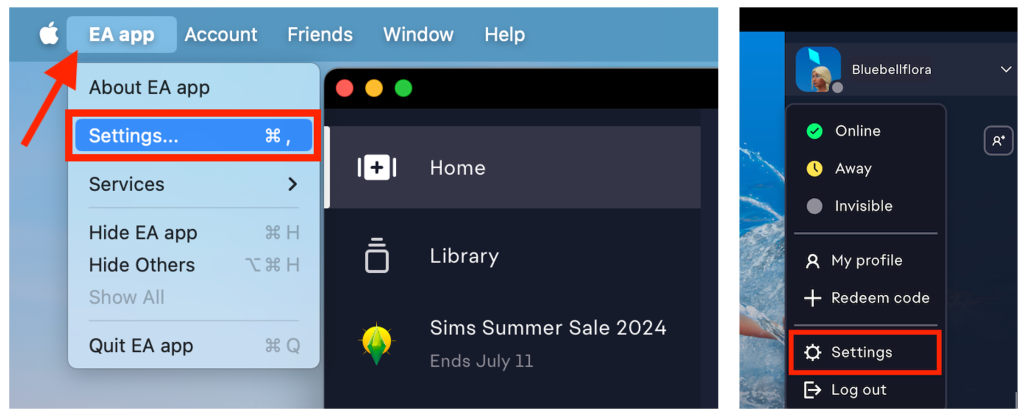
- In Settings click on the Download tab then Edit next to Install location.

- a Finder window will pop up. Navigate to where you would like your games installed to, click on the location, such as Applications or Applications > EA Games, then click Open. If you want to install the game on an external drive make sure it is mounted and showing in the Finder sidebar and simply click on it then select Open.
- The install location will have now changed and reflect the new location in EA App.
- If you are prompted to allow EA App access to removable volumes when changing to the external drive, click Allow.


do we need to reinstall the game or
LikeLike
only if you don’t move the current installation to the new location, or the game corrupts after moving it (always a possibility but a repair may fix it).
LikeLike
I already did the symlink on another hard drive. But my game is taking about 64GB of storage and im only on about 10GB of storage left.
I guess to put it simply, can I put the game and all the packs on an external hard drive and free up that 64GB on my internal hard drive its currently taking up. Do I need to uninstall and reinstall the games on the usb?
LikeLike
You can install the game wherever you like provided you change the installation location in EA App. There is no need to create a symlink for the game installation.
LikeLike
this really helped, i was about to create a whole new symlink before I realized I didn’t need to!
Just one thing, I recently had to repair my mac which is why i have to set this whole thing back up again. I haven’t deleted any of the files off my hard drive or moved the app off of it either, but all of my data is gone? do you have any idea what i should do or why this is happening? I REALLY don’t want to have to start all over again (this is the third time this would be happening to me and the third time i would have to remake my sims).
Hope to hear back soon, thanks in advance!
LikeLike
I tried looking back at the old guide you made on this topic. the exact issue i keep having is number seven: “Terminal tells me Directory not empty in Step 1– is there already a folder on the external drive with the same name as the folder you’re moving? i.e. have you already copied over the Electronic Arts folder?”
I made the silly little mistake of not going through with still telling my mac to move the doc onto my hard drive. i’ve done that officially now and moved my old sims 4 folder to the new EA folder, unfortuantely it keeps saying my game is “currently running.”
I’m going to keep reading around to see if i can fix the issue (im still following the old guide, i tried it once already, but it doesn’t seem like it’s working). i will keep updating in case anyone else has this issue as i wait for bluebellflora to respond. hopefully i can figure it own on my own so they won’t have to repeat something they’ve already said elsewhere TT
LikeLike
Can you join my Discord server? It’s where I troubleshoot now and is much better 🙂 https://discord.gg/EB9hZBDx34
LikeLike
sorry, just saw this! just joined
LikeLike
ive repaired my game in hopes that the ingenious fix would do something. it didn’t TT i went over all the things that the last article said could be causing this issue, but everything seems to be working and set as bluebellflora said it should be. do i really have to cut my losses and start over again?
(i’ve done the symlinks, created the shortcut into my harddrive, moved my older sims 4 folder in and out of new and old EA folders, i keep getting the same error)
LikeLike
Hi is it possible to create a symlink for The Sims 4 Packs folder? I want to move it to an external hd, without the base game (the game will stay in documents-local). Because my hdd isn’t compatible for the base game which prevented me from directly downloading the game into the external hd (preparing the installation took too long). I’m using the Ea app.
LikeLike
I figured out the answer. Apparently the sims 4 packs folder must be located in the same location as the base game or else the Ea app will crash.
LikeLike
hi when I move my sims game from the applications folder to my external do I delete what is in my applications folder or just leave it and change my settings in ea?
LikeLike
Delete it, EA App should only look where you tell it to in the Settings > Downloads
LikeLike