

Only applicable to the 32-bit version of the Sims 3
The graphics card issue is still grating away at me. I’m not affected by it and I don’t play Sims 3 anymore but it’s still irritating me because so many users are affected. I’ve always flirted with the idea of editing the .sgr files myself and uploading them but not having an affected Mac makes testing a little difficult. So, this is where you lovely Mac users come in! I need people willing to test the files for me, to download and put them in their game folders and see if we can get all of those pesky Intel chips finally recognised in the game.
This is a (hopeful) graphics fix only. If you are getting Found:1 Matched:1 and still encountering errors you need to read my Sims 3 help page for more help. If you have Late Night/Ambitions/Fast Lane/Outdoor Living installed you need to carry out additional fixes – getting the packs to show up in the Launcher and adding the relevant folders to the game files.
Jump to:
Description of problem and how it is solved
Information needed
Files ready for downloading and testing
Files confirmed as successful in launching the game
Description of problem and how it is solved:
Macs with AMD graphics cards are not affected as badly, this is the only type of card that throws up the unrecognised video card error in the game but will play anyway. Unsupported Intel chips just point blank refuse to load, as do some NVIDIA GPUs.
As a test I played around with adding lines to the GraphicsCards.sgr and GraphicsRules.sgr files for the AMD GPU in my current 2017 15″ Touch Bar MacBook Pro. It has an integrated Intel 630 chip and a discrete/dedicated AMD Radeon Pro 560, the game uses the AMD so we can safely ignore the Intel. After testing a couple of different lines the following text was recognised by the game and we finally had a recognised card!
For the GraphicsCards.sgr file:
card 0x67ef "AMD Radeon Pro 560"
For the GraphicsRules.sgr file:
match("${cardName}", "*Pro 560*")
Checking the DeviceConfig.log file confirms that the game has found and matched the card:

The graphics in my game really pop now. I added the card to the Uber settings as it has 4Gb VRAM so can happily handle super high settings.
Information needed:
If you’d like to help yourself and fellow Mac users, miserable at not being able to play their game properly, PLEASE let me know. Leave a comment on here, contact me on Facebook or on Twitter. I will need the following information from you though, in full:
- Exact model of your Mac. You can find this by clicking on the Apple in the menu bar then About This Mac. Please provide everything shown here:
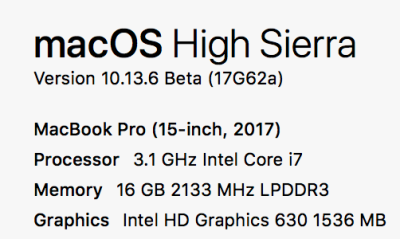 You may not think all that detail is important – it is!
 - Device ID – Click on System Report > Graphics/Displays and look for the Device ID:
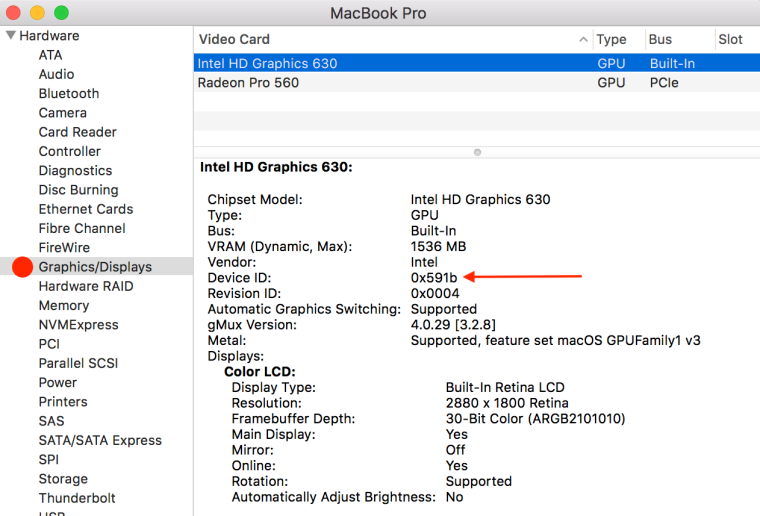
- If you have a 15″ MacBook Pro with an additional NVIDIA or AMD graphics card please provide the Device ID of that card together with the VRAM figure.
I’m confident that I already have the correct Device IDs for all unsupported Macs, giving me this information is just for verification. It also helps determine the graphics level your Mac is capable of.
Files ready for downloading and testing:
If your Mac has the listed graphics below please feel free to download and copy and paste the text from the files I have already uploaded. I have included a readme file in the download with full instructions on what to do, please read it! You must edit your GraphicsCards.sgr AND GraphicsRules.sgr files, not just one of them. These files have not been confirmed as 100% accurate yet, they are for testing, PLEASE comment below if they worked or not. Once I have confirmation that the files work and the game loads successfully, yielding both a Found and Matched positive result, I will post in a separate list.
AMD Radeon R9 M290X 2GB
AMD Radeon Pro M380 2GB
AMD Radeon R9 M390
AMD Radeon Pro 555 2GB
AMD Radeon Pro 570 4GB
Intel Iris Graphics 540
Intel Iris Graphics 550
Intel HD 515
Intel HD 5300
Intel Iris Plus Graphics 640
Intel Iris Plus Graphics 645
Intel Iris Plus Graphics 655
Files confirmed as successful in launching the game:
You can download the files below and add the details to your game, they have been confirmed as working. Instructions are included in the download:
AMD Radeon R9 M295X 4GB
AMD Radeon Pro 560 4GB
Intel HD 6000
Intel Iris 5100
Intel Iris Graphics 6100
Intel Iris Pro Graphics 5200
Intel Iris Plus Graphics 650
Intel UHD Graphics 617
20/08/2018
To all those who have posted back with their Found and Matched values….. thank you so, so much. You’re helping others and making the Mac Sims community a better place ❤
 Bluebellflora