

This is not a Mac only bug but affects users with integrated Intel chips. In the Mac family that is 13″ MacBook Pros, non-Touch Bar entry level 15″ MacBook Pros, all MacBook Airs, all MacBooks, Mac minis and entry level iMacs.
The bug is seen when entering First Person View/Camera in live mode:


Thankfully SimGuruNick has found a workaround and tweeted it for Windows users:
To access the GraphicsRules.sgr file on a Mac and make this change:
- Right click/Ctrl click on the Sims 4 app in your Applications folder and select Show Package Contents from the menu that appears.
- Open the Contents folder then double click the GraphicsRules.sgr file to open with TextEdit.
- Hit CTRL and F to bring up the search bar, type in skinning then hit enter.
- You should get two hits, the first one will already say false at the end. The second will say true and will be under the Intel section.
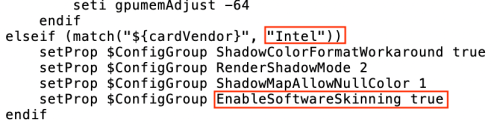
- Change the true to false then quit TextEdit, the file should automatically save. If it prompts for a save, save it.
You should now be eyeball and mouth free! Thanks to SimGuruNick for posting the workaround and also to adambrown_1982 at AHQ who allowed me to use his pictures and confirmed that changing the value to false also works.
 Bluebellflora