Glass vase and jar CC not showing correctly in game

Since the Cats & Dogs patches there have been various reports of some CC glass vases and jars not displaying properly in game:
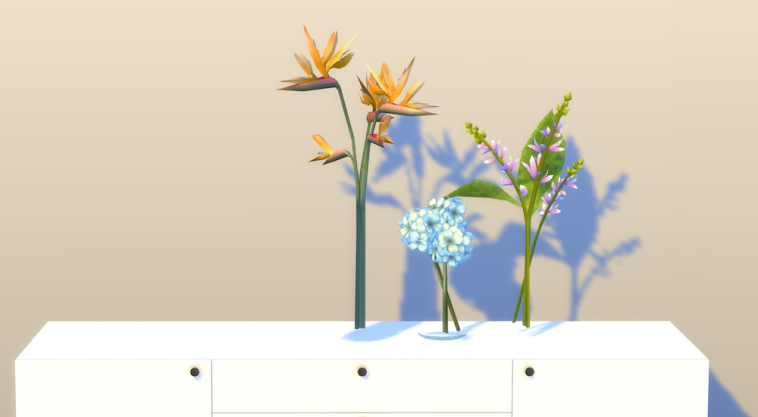
So far I’ve only seen reports from Mac users but it may be affecting Windows users too. This is apparently happening because EA changed something glass related in the November patch. If you are experiencing this there is no fix at the moment that I know of. Either EA need to fix something or the CC creators do.

Leave a comment below if you are also experiencing this, Mac or Windows 🙂
I made my first CC item!

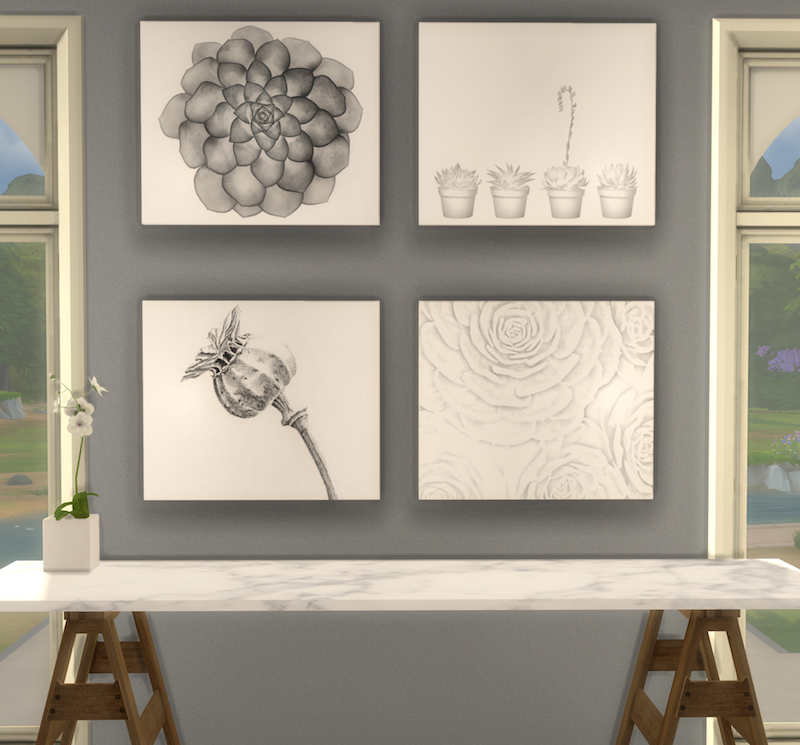
After a lot of blood, sweat and tears I finally managed to make my own mesh! It’s only a painting so nothing too complicated but it took several tries and I’m feeling immensely proud of myself.

I used the Windows version of Sims4Studio running in Parallels on my Mac and had to buy a scroll wheel mouse. Don’t ever try using Blender with a trackpad, it just doesn’t work. I only chose four pictures for the textures but they look good in the default size and if you make them bigger.

I have to say a BIG thank you to Orangemittens over at Sims4Studio for the wonderful tutorials on cloning an EA mesh and to Kitkat Sims for the help on changing the bump and specular maps 💚.

-: Download (SimFileShare, no Adfly) :-

Enlarged pictures (using MOO and ] ):

I’ve tested them in both macOS and Windows and they look great. As it’s my first mesh I’m sure I’ve made some horrible mistakes but bear with me – I’m learning!