I love El Capitan. My Macs are lovely and fast thanks to Apple’s little tweaks to speed everything up and of course Metal, which my MacBook Pro can take advantage of. Amazing.
But do The Sims 3 and The Sims 4 love El Capitan? Yes and no.
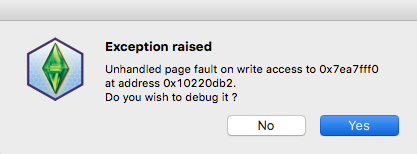
As soon as I clicked on Into The Future to launch Sims 3 the debug error popped up:
Tried it a few more times, no joy. So I tried bypassing the Launcher, same thing happened. Purged RAM, re-patched 1.67 and restarted. Nothing. Then I decided to follow my own advice and move out the Sims 3 folder and let the game regenerate a new one – it worked! The lovely Tremayne4260 pointed out that the same thing happened to her when she upgraded to Yosemite last year and she had to reinstall all her Store content. So I copied over my Store content from the old Downloads folder into the newly created one, opened the Launcher, selected everything then hit install. It worked, everything installed, all 3.5 Gb of it. I then moved over my Saves and everything is hunky dory again. Sadly there doesn’t seem to be any improvement in gameplay though but at least I can play.
I clicked on the Sims 4 icon to open it, Origin opened and immediately my Mac asked me if I was sure I wanted to open it as it hadn’t been opened before. Yeah, whatever. I clicked yes then had to enter my password for the Origin Helper Tool (why does that always pop up??) then Origin crashed. So I opened Origin on it’s own. After several attempts at logging in and more crashing later I finally managed to open it. I then quit it and launched Sims 4 from the icon in my Dock. Everything opened happily, super quickly in fact. I then started to play my Sim and wow, everything is smoother, quicker and lag free. The game has really ramped up a level on my trusty 2012 15″ MacBook Pro.
We have a thread for each game on the official forums for feedback and any possible issues that may arise. It already looks like there may be an issue with late 2012 21″ iMacs with the NVIDIA GeForce GT 640M 512 MB graphics. Please post if you are experiencing difficulties, EA are aware of them –
The Sims 3: http://forums.thesims.com/en_US/discussion/856422/el-capitan-and-the-sims-3
The Sims 4: http://forums.thesims.com/en_US/discussion/856370/os-x-10-11-el-capitan-official-release-thread

 Bluebellflora