

Bad lag in CAS since the June patch for Sims 4

As well as the Trackpad issue appearing since the 18 June patch we have a new lag issue in CAS that is pretty awful and affecting Mac users with Intel chips, judging by the posted specs. of some. You can see a video here of the issue.

Thankfully there are some really helpful Mac Simmers in the thread, candiecoatediv and twin-reverb-sims, who are being really responsive to requests for more information and actively trying suggestions. Twin-reverb-sims has suggested that doing the following has helped to minimise the lag a little:

  • Go into System Preferences > Accessibility > Display and check the box next to Reduce motion.
  • Go into System Preferences > Display and change the resolution towards larger text.

Please reply in the AHQ thread if you are experiencing this issue in CAS since the patch with your Mac information. And if you have any further suggestions which may help others, then definitely please post.
Sims 4 Trackpad gestures not working properly since June patch

Update 16/07/19 – This issue has now been fixed in the July patch, 1.53.115.1220.

Users are reporting that their Trackpad gestures aren’t working properly since updating their game to 1.52.100.1220 today (18/06/19). We have a thread running at Answers HQ about this, please take a minute to post the following if you are experiencing issues with your in-game Trackpad controls since updating your game:

  • List of gestures you normally use the Trackpad for (e.g. swipe or pinch to zoom)
  • Have you changed any default Trackpad settings in System Preferences?
  • Your Mac info: click on the Apple in the menu bar > About This Mac and post these details about your Mac:
    • macOS version
    • Model
    • Processor
    • Memory
    • Graphics

One or other of the Zoom and Rotate functions will work using the trackpad but not both, depending on which action you first used when you started playing. Please make sure to click the all important Me Too button on the AHQ thread too. Remember, EA need to know what Mac you are on in order to try and narrow down the cause. The more people who provide their specs. the better 🙂

To get around this issue and still be able to zoom and pinch in your game:

Zoom – two finger swipe up and down the trackpad (like scrolling up and down a page) or use the + and – keys.

Rotate – use the < and > keys.

Pixelated UI and greyed out menus in Sims 4

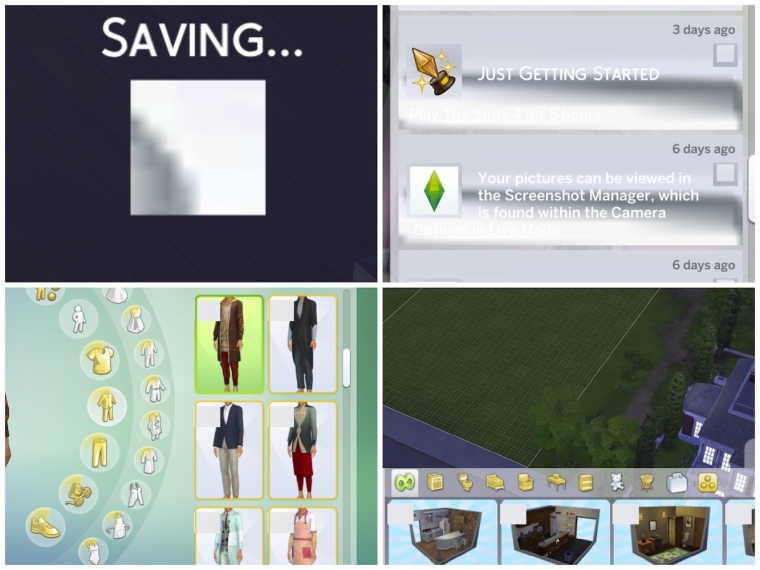
Since the April ’19 patch some Mac users have reported pixelated, blank and greyed out menu items, notification walls and other UI issues. Normally this would be related to an out of date UI mod but not all users have CC/Mods so it is possible this could be a new Mac bug.

(thanks to KattSimms, alexkostova1 and Ninjaaaahh for uploading the pictures)

If you are experiencing this, and can completely discount CC/Mods for causing the issue, please post in this thread over at Answers HQ – https://answers.ea.com/t5/The-Sims-Mac/POSSIBLE-BUG-UI-glitches-and-greyed-out-menus-after-April-patch/m-p/7819322#U7819322

Edit 18/06/19 – Cheezyeen and verfens have confirmed in the thread that allowing the game to run through the loading screens (Maxis/EA/Sims4 intros) and NOT clicking them to load the game more quickly stops this issue from happening.