

Apple announced last year that macOS 10.13 High Sierra will be the last version of the OS to support 32-bit apps. You can read this article which explains why they are doing this and what it means. Most apps produced in the last few years are 64-bit so there is no cause for concern but for most of our beloved Sims games this most likely means that it will be the end. This does not affect Sims 4 as it is already 64-bit.
If you have updated to macOS 10.13.4 you should have started receiving this notification when launching 32-bit apps:
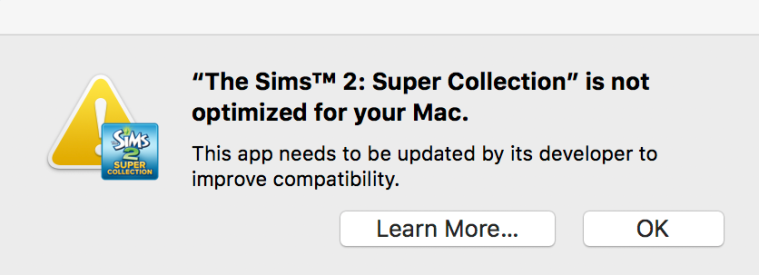
Until we can download the beta of the next macOS we’re not going to know when 32-bit apps will be rendered completely obsolete. I hoped to wait until we had the beta before posting this but I’ve received so many messages asking about it I thought a post now may help.
The following Sims games are currently 32-bit:
The Sims 2 Super Collection (Aspyr)
The Sims 3 (EA/Maxis)
SimCity 4 (Aspyr)
SimCity 2013 (EA – Origin; Aspyr – Mac App Store)
Sims Medieval (EA/Maxis)
If you would like to carry on playing these titles after 32-bit support is withdrawn there is a workaround. You can install High Sierra on a bootable external drive and install your 32-bit games on this drive. You would then simply boot up your Mac from that drive when you want to play. For those who haven’t done this before, it really is a very simple process – don’t be scared! I will upload a tutorial soon showing easy step by step instructions on how to do this.
Aspyr have announced that they hope to update their 32-bit games to 64-bit so they are still playable on future releases of macOS. You can read their support statement here, together with a full list of affected titles.
EA have yet to confirm or deny whether they will update their titles.
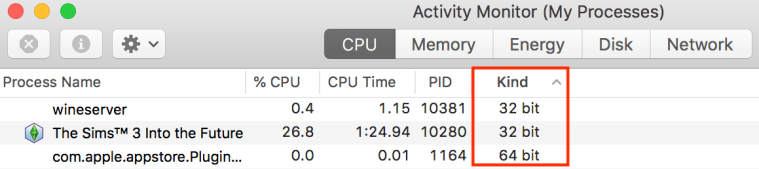
If you would like to see whether your apps are 32-bit or 64-bit read Apple’s article for instructions on finding the info in System Report. You can also check when the app is running by opening Activity Monitor:



 Bluebellflora