

Sims 4 bouncing in Dock but not opening

This is probably the most common issue Mac users are now reporting on the forums and seems to stem from the December 2017 game patch. I’ve no idea of the exact cause but it does also seem to be exacerbated with the installation of the Cats & Dogs EP.


CC/Mod users
In a lot of cases it could be something as simple as incompatible CC/Mods so always make sure that your CC/Mods are compatible with the current patch level of your game. If they are not then you should move them out of the Mods folder until the creator updates them.


If you’re trying to load the Sims 4 but all it’s doing is bouncing up and down in the Dock there are several things you can try. Make sure you try to load the game after following each of the following steps, move on to the next step if your game still isn’t loading:

  1. Go into Documents > Electronic Arts and move the Sims 4 folder to your desktop.
  2. Turn off any antivirus you may be running, firewall, or 3rd party apps which ‘clean up’ files.
  3. Right click on the game in your Origin games library and select Repair Game.
  4. Run the Origin reset tool.
  5. Go into Origin > Preferences > Origin in-game and disable Origin in-game.
  6. Go into Origin > Preferences > Notifications and turn off all notifications.
  7. Go into Origin > Preferences > Application > Start Up Options and disable Automatically start Origin and Origin Helper Service
  8. Create a new user account on your Mac and try to load the game in that account.

Still not working? Try the super repair:

  1. In your Applications folder right click on the Sims 4 app and select Show Package Contents.
  2. Navigate to Contents > Mac OS.
  3. Right click on The Sims 4 and select Move to Trash. Don’t drag the file as it will only move an alias and leave the original in place.
  4. Open Origin, right click on The Sims 4 in your Games Library and select Repair Game.

Still not working? If you’re running a version of macOS prior to 10.11 El Capitan please consider upgrading to the latest version your Mac supports.

A lot of CC and Mods broke after the November and December patches so make sure any you have installed are fully compatible with your game version. You will need to check with the creator for any updates. Consider installing Sims4Studio for Mac so you can run any batch fixes for known CC issues.

I’ve set up a thread for this over at AHQ so please do either leave a comment below or head over there and post in the thread.

Sims 4 CC and Mods not showing up in-game

Sometimes there are spikes in this issue being reported and it usually coincides with a game update or macOS update. Game updates can render CC/Mods incompatible so you need to check with the creator that the content you use has been updated to work with the current patch level of the game. When macOS updates are applied this can sometimes change iCloud Drive settings if dialogue windows ask the user to confirm new actions so check the location of your Documents folder in System Preferences.

  1. Are CC and Mods enabled in your game options? If not enable them and restart the game.
  2. Is your game fully patched up to date?
  3. Are the CC and Mods you’re trying to use fully compatible with the latest version of the game? Check on the creator’s website that they are. The good creators will always check their content is compatible after an update and release an updated version if necessary or possible. Check the SimsVIP broken Mods page for updated lists after each patch.
  4. Are the CC/Mods definitely for Sims 4 and not Sims 1, 2 or 3?
  5. Have you unzipped the downloaded CC/Mods so you are only placing .package and/or .ts4script files in your Mods folder?
  6. Do you have iCloud Drive enabled to store your Documents folder in the cloud? If your Mac internal storage is getting full and Optimise Mac Storage is enabled, it will automatically push files to the cloud.
  7. Have you tried repairing your game? Right click on the game in your Origin games library and select repair game.

ItsaprilXD’s fabulous guide to installing CC/Mods on a Mac is also worth a read.

Disable Origin in-game

Running macOS Mojave? Updated security settings in the operating system no longer permit Origin in-game to run. If you want to have it enabled please read this update – https://bluebellflora.com/2018/09/22/disabling-origin-in-game-is-the-way-forward/


Having Origin enabled in-game has always caused issues on Macs. As well as causing lagging issues it can also cause your game to not load, something which seems to be becoming more frequent amongst players. So the best thing to do is just disable it. Unfortunately you will have to do this after each Origin update as it annoyingly enables itself each time.

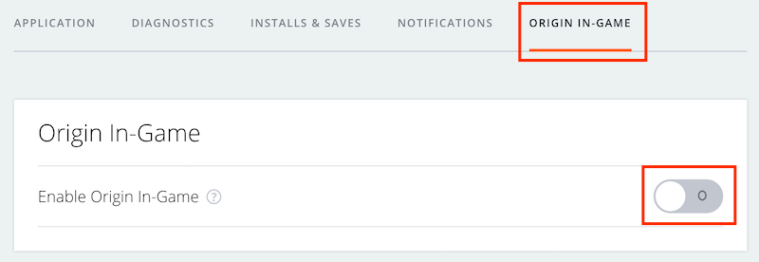
  1. Open Origin then click on Origin > Preferences in the menu bar
  2. Click on Origin in-game on the right side 
  3. If Origin is enabled in-game the button will show green. Click on it to turn it off so it looks like the picture above.
  4. Right click on the game in your Games Library and select Game Properties. Uncheck the box next to Enable Origin In Game for The Sims 4.