
Sims 4 Tray Importer for Mac

ts4-site-button

Here’s a link to using the Sims 4 Tray Importer in macOS. Getting it to run seems a bit hit or miss but it appears that with a little perseverance some users are getting it to run in Sierra.

Sims 4 Tray Importer for Mac

The guide is really detailed and very easy to follow and the comments are very informative too – good luck!


Update January 2018

As of January 2018 the Mac version of Tray Importer is no longer compatible with the Sims 4:

S4TI for MAC is no longer available. The app no longer works with the latest update of the Sims 4 and the developer does not want to provide support on MAC (platform it does not have and which greatly complicates its development …)

Sorry folks, seems like it’s the end of the road for us Mac users. I’ll update this page if it is resurrected.


Update April 2018

Well, seems like it’s up and running again as of the 4th April 2018. Just follow the links above!

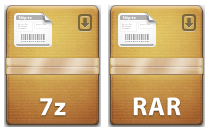
Extracting Sims 4 CC Zip files for Mac, including 7z and RAR files

Lots of Simmers, Mac and Windows users, still have issues installing CC and Mods into their game because of the compression methods some creators use. I was late to the CC party and experienced this as the built in Archive Utility in macOS can’t handle 7z files.

The best tool I have found to extract 7z and rar files is The Unarchiver and you can download it straight from the Mac App Store here. It’s really simple to use as it sets itself up as the default unarchiver on your Mac so once installed you don’t have to do anything. I don’t normally like any software that overrides Apple’s Apps but I’ve been using this ever since my CC obsession started and had no problem with it.

  1. Download The Unarchiver from the App Store. It will automatically install.
  2. Download some CC in 7z or rar format. The downloaded file will now look like one of these in your Downloads folder: 
  3. Now just double click on the 7z or RAR file (like you would a normal Zip file) and The Unarchiver will extract the contents into a new folder in your Downloads folder. You can now move the .Package files from the extracted folder into your Mods folder.

More information and help:

  • For a step by step guide on how to install CC/Mods have a look at ItsaprilXD’s brilliant guide here
  • It’s always a good idea to get rid of the special characters (*[]%-_ etc.) from CC filenames as it will help to speed up your game a little. For a further explanation see my page here. Rather than manually change every filename I created an Automator App which will get rid of the characters for you. You simply drag the files to the App and the special characters are removed.


Origin not tracking Sims 4 hours played

This seems to affect every Mac user and has been around pretty much since the game was released. And you know what? I absolutely couldn’t care AT ALL.

IT IS A COMPLETE NON-ISSUE.

If Origin isn’t correctly tracking the amount of hours you spend playing the Sims 4, and the last time you played, then just accept it and move on. It does not affect gameplay in any way, shape or form. There are various posts that people have written over on the official games forum and AHQ regarding this and EA are aware of it.

I have a few questions for those people who are having meltdowns about this NON-ISSUE:

  1. Does this bug stop your game from loading?
  2. Does this bug cause your game to crash?
  3. Does this bug cause your game to freeze?
  4. Does this bug stop Origin from working?
  5. Does this bug stop Origin updating?
  6. Does this bug cause the game to not update?
  7. Does this affect your ability to play the Sims 4 in any way?

If you answered no to every single one of those questions then you need to evaluate what is important to you as a gamer. Because if it’s counting the hours you’ve played and the date you last played then I’m sorry, but you’re doing it all wrong.